 Making
Overview
Oh My Baby is a baby log you can use with one hand during a night feed. After reading 283 low-rated reviews of rival apps, we settled on one-tap logging, a single purchase instead of a subscription, and a start that needs no login. We launched on Android on November 12 and on iOS on November 16–17, and in the 11 days since we have fixed an error that hit right at startup and two iOS review rejections.
Logging at night
The users we had in mind are caregivers logging with one hand while holding a baby at night, and two-caregiver households where partners split the hours. To see where existing apps let them down, on October 11 we read and sorted all 283 one- to three-star Google Play reviews of five rival baby log apps, including BabyTime, Piyolog and Huckleberry.
The biggest complaint, at 115 reviews, was subscriptions, paid upgrades and paywalls. That figure comes from keyword sorting, so it is an approximation. Next came lost records at 36, forced login and unrecoverable accounts at 24, and full-screen ads right after logging at 21, and these four became the basis for the design below.
We also decided what to leave out. There is no AI chat, no fever-medicine dose calculator, no record photos or growth album, and no full-screen ad after logging. Sleep prediction and sleep scores are out too, because features like these would push the app toward a subscription model.
Four buttons and a widget
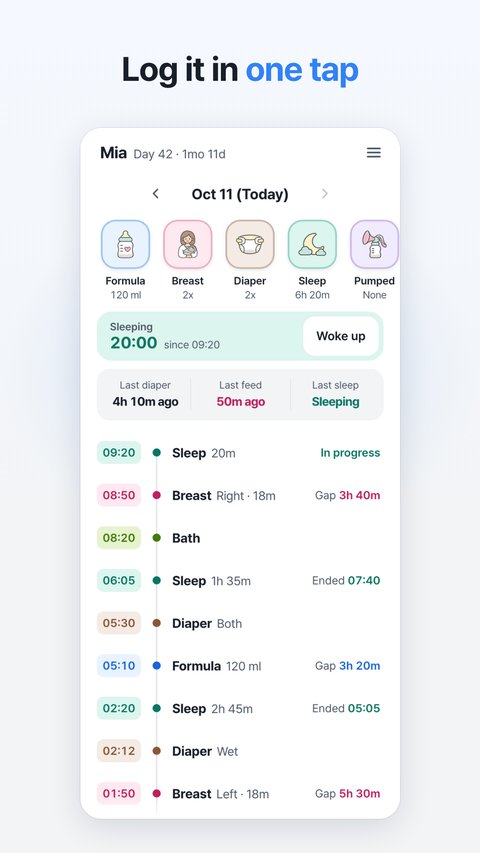
The home screen has four buttons: feeding, diaper, sleep and bath. One tap logs the entry right away, and for feeding and sleep a tap starts a timer. Logging works without an internet connection.
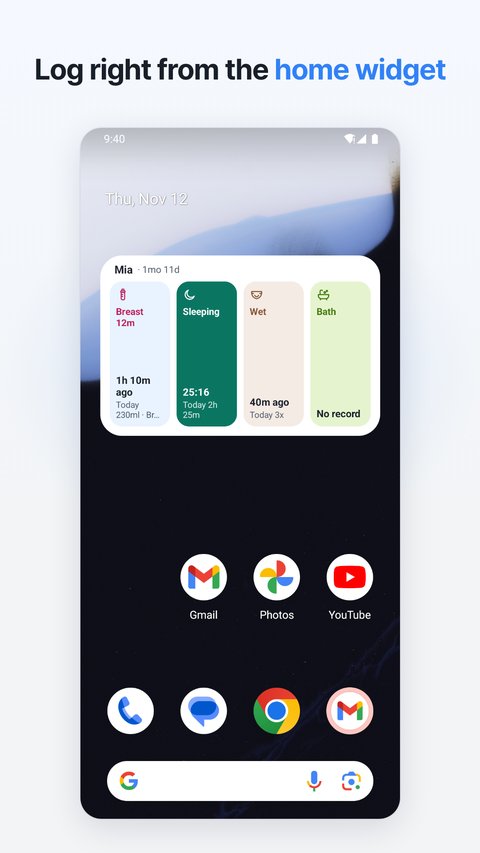
With the home screen widget you can log without opening the app. Our design target is under three seconds from tapping the widget to seeing the save confirmed, but we have not timed it yet, so it is not measured. Your records show the day hour by hour, with night entries and feeding intervals available separately, and weight, height and head circumference are entered as numbers and viewed as charts.
We followed the Toss and Kakao apps in giving each screen a single task. On October 13 we removed the bottom tab bar and moved to a menu drawer, because every screen outside home has only one task and there was no need to switch between tabs. Parts such as picking a past time were chosen by comparing three mockups side by side.
One purchase instead of a subscription
Oh My Baby has no subscription. A single ₩8,800 (KRW) purchase removes ads, lets you add more babies, and raises the number of caregivers who can log together from two (free) to four.
We picked the middle of three candidates, ₩6,600, ₩8,800 and ₩25,000, as the baseline price. We do not yet know whether it is right, so we plan to adjust it after looking at the purchase conversion rate four weeks after launch.
Caregiver sharing starts with an invite code, which expires after 24 hours. When one caregiver connected by invitation buys, the family’s other devices get the purchased state too. We did not use Apple Family Sharing, because it works only on iOS and cannot be turned off once it is on.
Records stay on the phone
You start without logging in, and by default records are stored only on that phone. Records go to a server in the Google Cloud Seoul region only when you turn on caregiver sharing or sign-in backup.
We added backup because of the complaints about lost records, and it is optional: only people who want it sign in with an Apple or Google account to turn it on. We also looked at anonymous sessions and recovery codes without login, but dropped them because records might not carry over to a new device or users might lose the code.
Before sharing or backup starts, a consent screen appears. It first shows what goes to the server, what stays on the device and how to end it, and nothing starts until you tap [Agree and start]. We wrote up how we built that screen in the consent step post.
Settings and ad consent never go to the server. Sign-in backup uploads no photos, and caregiver sharing uploads a single downsized baby profile photo only if you have agreed to photo sharing. We show only non-personalized ads, so the app does not show the app tracking permission prompt either.
The first 11 days after launch
Development started on October 11 with market research and planning. We built the iOS home widget on October 12, the lock screen Live Activity and the caregiver sharing design on October 15, and sign-in backup from October 18 to 26. On October 22 we added five languages and moved the Apple Watch and Wear OS apps to version 1.1. On November 6 we submitted to both stores.
Version 1.0 went live on Android on November 12 and on iOS on November 16–17. By November 23 we had shipped six updates on Android and four on iOS.
Version 1.0.4, released on November 21, jumped to an error screen three seconds after opening. A shared module that checks for app updates wrapped the object for native phone features the wrong way when returning it, so the app fell into error handling as soon as it started. Unit tests used a fake object and missed it, and we had no step for installing the store build on a real phone and checking the start screen before release. We fixed it in 1.0.5 and released it the same day.
On iOS we had two review rejections. Version 1.0.4 was rejected under guideline 2.1. In 1.0.5, tapping [Take photo] for the profile photo closed the app at once because the camera permission text was missing, which never showed up in web development or Android checks and was first caught in review on an iPad. Not submitting the first in-app purchase together with the app version was also a reason for rejection, so the next day we resubmitted 1.0.6 with the purchase and it went live on November 23.
As of November 23, Google Play reports zero crashes and zero app-not-responding errors. Firebase Crashlytics, a tool that collects app crashes, also shows 100% crash-free users. With so few users, though, these rates do not mean much yet.
From this we drew up three candidate checks to carry over to our next app:
- Open the store build on real Android and iOS phones and confirm the home screen stays up for 20 seconds
- Check that camera, photo and notification permission text exists in all five languages
- Submit the first in-app purchase for review together with the first version
What we don’t know yet
As of November 23 we have zero store reviews and zero inquiries. Daily active users number one to four, and most appear to be us and review devices. We did no user interviews or surveys before launch and defined the problem from market research alone, so we have not yet confirmed that this design fits real parents.
We will compile installs, revenue and return visits at the eight-week review in January 2027. The Apple Watch and Wear OS apps come in 1.1.
Oh My Baby is on Google Play and the App Store, in Korean, English, Japanese, and Simplified and Traditional Chinese (Android 7.0 or later, iOS 15 or later). If you try it and something gets in your way, let us know through [Contact us] in the app.